Find the moments
Automatic shot detection breaks up the edit. Frame suggestions give you a starting point, and frame-by-frame controls keep the final choice with you.
Meet StillPick Desktop. Go from a folder of footage to a collection worth sharing—with a head start on every shot.
Your footage stays on your computer.
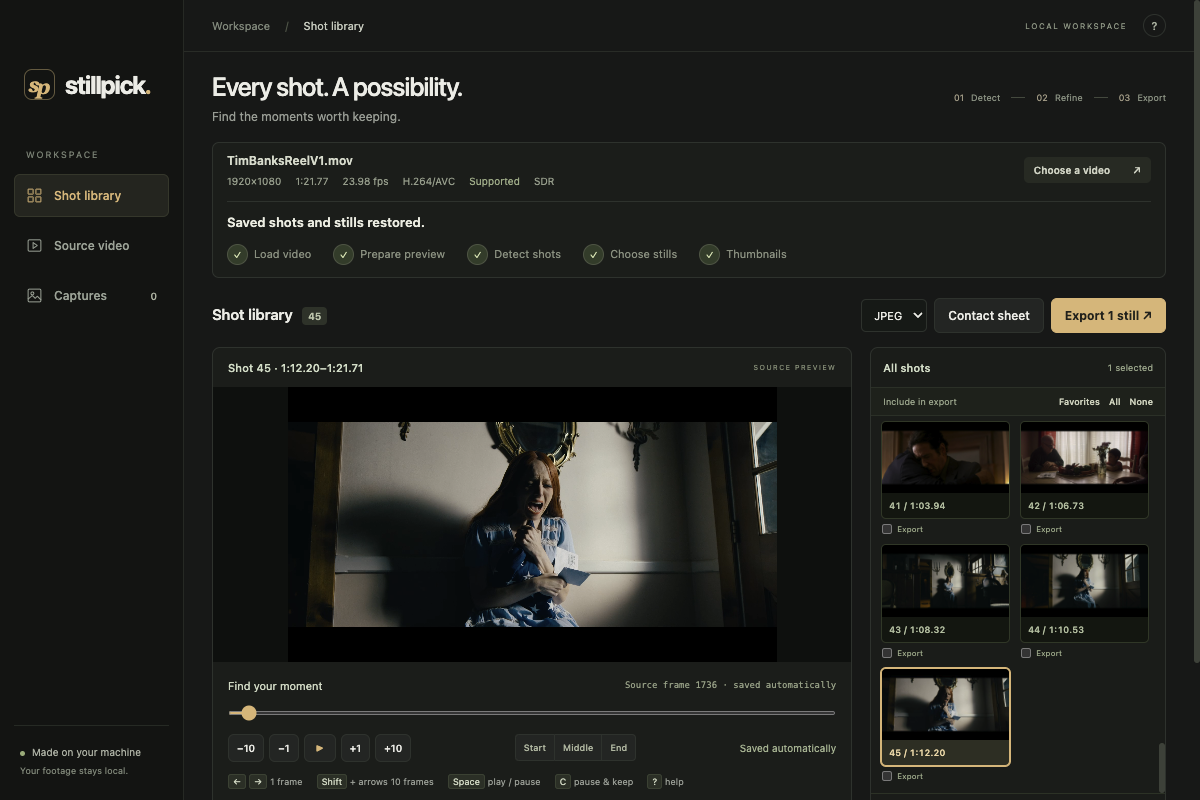
Start with suggested frames. Scrub to make them yours. Export a set you’re happy to put your name on.
Automatic shot detection breaks up the edit. Frame suggestions give you a starting point, and frame-by-frame controls keep the final choice with you.
Drop in multiple videos and let the queue run. Review completed files while the next one processes, then return to your saved picks.
Work with ProRes, MXF, H.264, HEVC, DNxHD / DNxHR and more. Explore file types and codecs.
Crop and resize, apply a 3D LUT, and export individual stills or a contact sheet. Full-resolution exports come from your original footage.
| What you want to do | Free web app | Desktop |
|---|---|---|
| Choose and save frames yourself | Included | Included |
| Detect shots and suggest frames | — | Included |
| Queue videos and save projects | — | Included |
| Crop, resize, and apply 3D LUTs | — | Included |
| Preview and export contact sheets | — | Included |
| Video file types | MP4, MOV, WebM and other files your browser can play | MOV, MP4, M4V, MXF, MKV, AVI, WebM and MPEG files |
| Video codecs | H.264 is a common choice. HEVC, VP8, VP9 and AV1 depend on your browser and operating system. | H.264 / AVC, H.265 / HEVC, Apple ProRes, Avid DNxHD / DNxHR, GoPro CineForm and more |
| Professional footage | Limited to browser playback; no built-in conversion | Local decoding for ProRes and MXF footage, including supported 10-bit 4:2:2 AVC / HEVC recordings |
| Still image exports | JPEG, PNG and a ZIP of your captures | JPEG, 16-bit PNG, 16-bit TIFF and PNG contact sheets |
Desktop capabilities shown are in the current Mac development build. Compatibility depends on both the file type and the codec inside it. See the full format list and testing status.
Bring footage from an edit, a camera, or your phone. Desktop opens a broader range of video locally, so you can find your stills beyond the formats a browser can play.
Current Mac development build · Public release compatibility is still being qualified.
Tested workflows: playback, capture, and export with H.264 MOV/MP4 and ProRes MOV footage, plus generated 10-bit 4:2:2 AVC/MXF and HEVC/MP4 test clips. The standard codec list above is enabled in the app’s media engine; every profile and file combination has not been tested.
Sony and Canon footage: check the recording’s codec and file type, rather than the camera name alone. Individual camera recording modes are still being qualified; this is not a blanket guarantee for every XAVC or XF-AVC file.
Camera RAW is separate: RED R3D and ProRes RAW are not part of the supported release offer. Blackmagic RAW, ARRIRAW / ARRI HDE, Canon Cinema RAW Light, and Nikon N-RAW require additional decoder work. “Uncompressed video” above does not mean support for these camera RAW formats.
Color: being able to decode a file does not guarantee a finished HDR or Log look. HDR, Log, and wide-gamut color workflows are still being validated. Read compatibility and system requirements.
Before purchase, read the Desktop license, Refunds & delivery policy, and system requirements. These are pre-release drafts.
Yes. The planned desktop trial includes 72 hours of full access from your first trial activation, including full-quality exports. No card is required and there is no automatic charge. Connect once to start, then use the remaining trial offline. After it ends, your projects and edits stay accessible; exporting requires a purchased license. The trial download is not available yet.
At launch, you’ll pay once and receive a download and license key by email. Enter the key in StillPick to activate up to two computers. An internet connection will be needed for activation; video processing will stay local.
Not yet. The storefront is being prepared while we finish licensing and the public release. The launch price will be $29 once. Joining the interest list does not place an order or reserve a copy.
No. Suggestions are a starting point. You can scrub each shot and adjust its selected frame immediately, so a near miss is easy to fix.
The planned offer is a desktop license for two computers, with no recurring charge. Update coverage, supported systems, and refund terms will be confirmed before checkout opens.